
Picture this. Phone buzzing nonstop with WhatsApp notifications. Forty unread emails. Three different Excel sheets open at once just to remember who wants to buy and who wants to sell. Sound familiar? For a lot of agents, that’s just Tuesday. Once buyer and seller information gets scattered across sticky notes, random folders, and paper files, things start slipping. A follow-up here, a property preference there, and suddenly you’re spending your morning hunting for something that should’ve taken ten seconds to find.
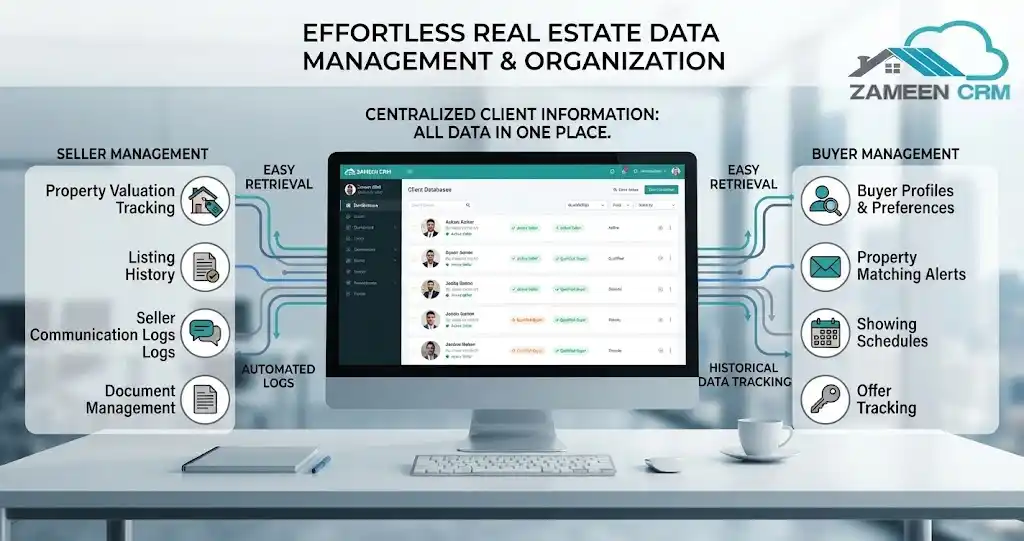
A real estate CRM solves this by pulling client information, communication history, documents, property requirements, and deal activity into one place. No more bouncing between five apps to piece together one client’s story. Here’s what real estate CRM software actually changes about your daily operations, your team, and how much you get done in a day.
Why Buyer and Seller Records Become Difficult to Manage
Every property business starts manageable. A spreadsheet for leads, a handful of saved numbers, notes scratched onto a desk pad.

It never stays that way for long. This is where things fall apart:
- Multiple spreadsheets that never quite agree with each other
- Contact lists split across different devices
- WhatsApp and email threads you can’t search through in any useful way
- Property requirements that go missing, leading to mismatched viewings
- Documents nowhere to be found right when a contract needs signing
- Follow-ups quietly forgotten, and a deal along with them
- Managers who genuinely can’t see what the team is doing
Manual tools only get you so far. A dedicated platform puts the order back, so every piece of client data actually lives where it’s supposed to.
How Real Estate CRM Organizes Buyer and Seller Records
Centralized Client Profiles
Every client interaction is part of a bigger story. A decent CRM pulls all of it into one clean profile instead of leaving you to reconstruct it from memory.
Contact details, buyer or seller status, budget, location requirements, and everything that’s happened so far, all visible at a glance.
Communication and Activity Tracking
Forgotten what you promised a client on a call last Tuesday? Happens to everyone. A real estate CRM logs calls, emails, messages, meetings, and notes automatically, so you’re not relying on memory.
The whole team can see the full communication history from one place. Someone calls in sick, another agent steps in, and the client never has to repeat themselves.
Document Storage and Management
Paper contracts vanish. Coffee gets spilled on the wrong stack. Desktop folders get deleted by accident, usually right when you need them most. Modern tools let you attach files straight to the client profile or the transaction they belong to.
Contracts, disclosures, ID documents, property paperwork, and closing files are stored securely and actually findable later.
Tags, Filters, and Search
Finding one contact shouldn’t take ten minutes of scrolling through a list. Smart tagging and filters let agents segment records in seconds.
Hot leads, past clients, one specific property type, a tight budget range, whatever it is, a searchable database gets you there fast.
How CRM Helps Manage Buyers and Sellers Differently
Buyers and sellers sit in the same database, but day-to-day, they need completely different tracking.
| Buyer Management | Seller Management |
| Budget and preferences | Property listing details |
| Preferred locations | Listing timeline |
| Property matches | Showing feedback |
| Viewing history | Buyer inquiries |
| Follow-up activity | Closing checklist |
| Purchase requirements | Transaction documents |
What a solid real estate client management system actually gets right is keeping both sides linked to the correct property and transaction. No more guessing which buyer fits which listing.
How CRM Keeps Every Property Deal on Track
Landing a client is only half the job. Getting them through the pipeline smoothly is where the actual business happens.
The standard journey looks like this: Inquiry, Qualification, Property Match, Viewing, Negotiation, Documentation, Closing.
Keeping that moving takes the right tools:
- Visual pipeline stages showing exactly where every deal sits
- Real-time status updates, so nothing quietly stalls
- Full viewing history and showing feedback
- Automated follow-up reminders and task assignments
- Closing deadlines that protect your commission
Nail property deal management, and the whole operation starts feeling like a well-oiled machine. Reach out to ZameenCRM and see what these pipelines actually look like running.
Key Benefits of Organized Real Estate CRM Records
Ditching messy spreadsheets pays off almost immediately:
- Client information pulled up in seconds when someone calls out of nowhere
- Fewer missed follow-ups, happier clients who stick around
- Real coordination across the agency, not just guesswork
- Document retrieval that doesn’t turn into a scramble at closing
- Clear deal visibility for agents and managers both
- Buyer-property matches that are actually accurate
- Way less reliance on spreadsheets that break the moment someone mistypes a cell
Real Estate CRM vs. Spreadsheets for Client Records
| Spreadsheets | Real Estate CRM |
| Separate files | Centralized database |
| Manual updates | Automated activity tracking |
| Limited communication history | Complete interaction history |
| Difficult filtering | Advanced tags and filters |
| Manual reminders | Automated follow-ups |
| Scattered documents | Client-linked documents |
| Limited pipeline visibility | Visual deal pipeline |
Final Takeaway
Running a real estate business without a proper system is an uphill fight against scattered data, day after day. Move the client database, documents, and pipelines into one dedicated platform, and you get real hours back every week.
Ready to change how your agency handles client data? Reach out to ZameenCRM at +61 491 678 165 or email info@zameencrm.com to streamline your workflow today.
Frequently Asked Questions
What is a CRM in real estate?
Software that manages client relationships, tracks listings, stores documents, and keeps an eye on your sales pipeline, all in one spot.
How does a real estate CRM organize client information?
It gathers contact details, communication history, notes, and preferences into searchable profiles. No more spreadsheets, no more paper notebooks.
How does CRM help real estate agents manage buyers and sellers?
Buyer budgets and viewing history stay separate from seller timelines and showing feedback, but both live under the same roof so nothing gets confused.
What information should a real estate CRM store?
Contact details, communication logs, meeting notes, property preferences, budgets, contracts, full transaction histories.
How does a CRM track buyer and seller communication?
Calls, emails, texts, and meeting notes all get logged straight into the client’s profile, so you’ve got a full timeline whenever you need it.
Can a real estate CRM store contracts and documents?
Yes. Contracts, disclosures, ID documents, and closing paperwork can be uploaded directly to the client or property record.
How does a CRM help real estate agents follow up with clients?
It fires off automated reminders, task notifications, and alerts tied to activity or deal stage, so leads stop quietly slipping away.